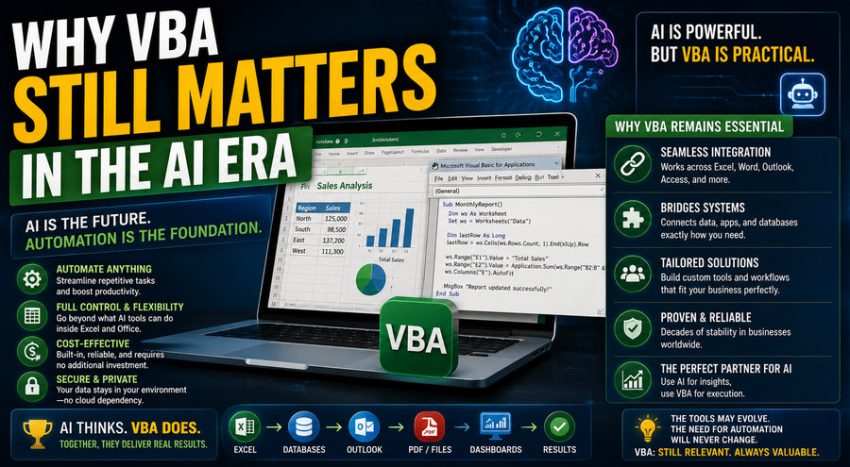

Artificial intelligence is changing the way people work with software. Tasks that once required hours of manual effort can now be accelerated with AI assistants, automation platforms, low-code tools, and advanced analytics. In this environment, it is reasonable to ask whether older technologies such as VBA—Visual Basic for Applications—still have a place in modern business.
The answer is yes.
VBA may not be the newest programming language, but it remains deeply embedded in Microsoft Office workflows, especially in Excel. Millions of businesses still rely on spreadsheets for finance, accounting, reporting, operations, engineering, procurement, planning, and administration. Wherever Excel remains important, VBA can still provide enormous practical value. 📈⚙️
AI has not made VBA irrelevant. In many ways, AI has actually made VBA easier to use because people can now get help writing, explaining, debugging, and improving macros.
The future is therefore less about VBA versus AI and more about VBA working alongside AI.
🧠 What Is VBA?
VBA stands for Visual Basic for Applications.
It is a programming language built into Microsoft Office applications such as:
- Excel
- Word
- Access
- Outlook
- PowerPoint
VBA allows users to automate repetitive tasks, manipulate documents, create custom business logic, build forms, connect applications, and extend the capabilities of Office software.
In Excel, for example, VBA can:
📊 Format reports automatically
📁 Process hundreds of files
🧮 Perform calculations
📧 Generate emails
🔄 Import and clean data
📄 Create PDFs
🖱️ Add buttons and user interfaces
For many office-based professionals, VBA has historically been the bridge between being a spreadsheet user and becoming an automation developer.
📊 1. Excel Is Still Everywhere
The strongest reason VBA still matters is simple:
Excel still matters.
Despite the growth of cloud analytics platforms, business-intelligence software, ERP systems, and AI tools, spreadsheets remain one of the most widely used business technologies.
Organizations use Excel for:
💰 Financial modeling
📦 Inventory tracking
📈 Sales forecasting
🏗️ Engineering calculations
🧾 Accounting reconciliations
👥 Workforce planning
📊 Management reporting
Many of these spreadsheets contain years of accumulated business logic.
A company may have hundreds of Excel workbooks that employees depend on every day.
Replacing all of them with new software is often expensive and unnecessary.
VBA remains valuable because it can automate the tools businesses already use.
⚙️ 2. VBA Is Excellent for Repetitive Office Tasks
One of VBA’s greatest strengths is straightforward automation.
Imagine an employee who performs the following process every morning:
- Downloads a sales report
- Opens the file
- Deletes unnecessary columns
- Applies formulas
- Creates a pivot table
- Formats the report
- Saves a copy
- Emails it to managers
If the process takes 30 minutes each day, that becomes more than 120 hours per year.
A VBA macro may be able to perform much of that workflow in seconds. ⚡
This is where VBA remains extremely practical.
Not every business problem requires machine learning or a sophisticated AI system.
Sometimes the best solution is simply:
“Click this button and automate the next 15 steps.”
🤖 3. AI Makes VBA Easier to Learn
Historically, one of the biggest barriers to VBA was programming knowledge.
A finance analyst might know exactly what they wanted Excel to do but not know how to write the code.
AI coding assistants have changed this.
A user can now describe a task such as:
“Create a VBA macro that loops through every Excel file in a folder, copies data from Sheet1, and combines it into a master workbook.”
An AI assistant can help generate a starting point.
Users can also ask AI to:
🧠 Explain unfamiliar VBA code
🐞 Identify bugs
🔄 Rewrite inefficient macros
📝 Add comments
🔐 Suggest safer error handling
⚡ Improve performance
This lowers the barrier to VBA development dramatically.
AI does not eliminate VBA—it can make VBA more accessible.
🧩 4. VBA Works Directly Inside Excel
AI platforms usually operate outside the spreadsheet environment or through integrations.
VBA has one powerful advantage:
It lives inside Office.
A macro can directly interact with:
- Worksheets
- Cells
- Charts
- Pivot tables
- Named ranges
- Workbooks
- Forms
For example, VBA can immediately tell Excel to:
Open Workbook → Filter Data → Update Pivot Table → Format Cells → Save ReportThis tight integration makes VBA extremely effective for desktop Office automation.
There is no need to build a separate application just to manipulate a workbook.
💼 5. Many Businesses Have Large Existing VBA Systems
Organizations have been using VBA for decades.
This means there are enormous numbers of existing macros and applications already in production.
Examples include:
🏦 Banking models
💰 Financial reporting systems
🏭 Manufacturing tools
📊 Management dashboards
🧾 Accounting processes
🏗️ Engineering calculators
Some of these systems may contain thousands of lines of code.
Replacing them requires:
- Development time
- Testing
- Training
- Validation
- Migration
If the existing VBA solution continues to work reliably, companies may have little reason to replace it immediately.
This creates continuing demand for people who understand VBA.
📈 6. VBA Is Especially Valuable in Finance and Accounting
Finance professionals often work heavily in Excel.
Typical workflows include:
💵 Budgeting
📉 Variance analysis
🏦 Cash-flow forecasting
🧾 Reconciliation
📊 Financial modeling
📅 Monthly reporting
VBA can automate repetitive portions of these activities.
For example, a financial analyst might use VBA to generate individual reports for 50 departments.
Instead of manually filtering and saving each report, a macro can loop through the departments automatically.
This can dramatically improve productivity.
🏗️ 7. Engineers Still Use Excel and VBA
Engineering organizations also rely heavily on spreadsheets.
VBA may be used for:
📐 Design calculations
📊 Equipment sizing
⚙️ Simulation inputs
🧪 Laboratory data processing
📈 Performance analysis
🧾 Technical reports
An engineer may combine equations, tables, charts, and VBA into a custom calculation tool.
More advanced engineering software may provide greater capability, but Excel remains useful because it is widely available and easy to customize.
🔗 8. VBA Can Connect Different Office Applications
VBA is not limited to Excel.
A macro in Excel can interact with Word, Outlook, or PowerPoint.
For example:
Excel data → Word report
or:
Excel results → Outlook email
A business workflow could automatically:
📊 Calculate results in Excel
📄 Create a Word document
📧 Email the document through Outlook
This type of cross-application automation remains useful in many organizations.
📄 9. Automated Reporting Is Still a Major Use Case
Reporting consumes significant time in many companies.
Managers frequently need reports that follow the same structure each week or month.
VBA can automate:
📈 Chart creation
📊 Table formatting
📄 Report generation
📁 File naming
📧 Distribution
Suppose a company has 100 branches.
A macro could create one report for each branch automatically.
Without automation, an employee might spend hours repeating the same actions.
💰 10. VBA Is Cheap to Deploy
A major advantage of VBA is cost.
If a business already uses Microsoft Office, VBA capability is generally already available.
A company may not need to purchase:
💻 Separate development environments
☁️ New cloud infrastructure
📊 Specialized automation platforms
This makes VBA especially attractive for smaller organizations or departmental automation.
A financial analyst can build a useful tool without requesting a full software-development project.
🏃 11. VBA Is Fast for Small Business Solutions
Traditional software projects may involve:
- Business requirements
- Developers
- Databases
- Testing
- Deployment
That approach is appropriate for large systems.
But what if one team needs a simple tool tomorrow?
VBA can be very effective for rapid solutions.
A knowledgeable user can build a macro-driven workbook quickly.
This makes VBA particularly useful for:
🧪 Prototypes
📊 Internal tools
⚙️ Temporary automation
📋 Department workflows
Not every spreadsheet macro should become permanent enterprise software, but VBA is excellent for getting useful automation working quickly.
🧠 12. AI Does Not Automatically Understand Every Business Process
AI can generate code, but it does not automatically understand every organization’s unique rules.
Consider a company where invoice processing depends on:
- Department codes
- Customer type
- Tax region
- Approval thresholds
- Special exceptions
Someone still needs to understand the business process.
VBA allows knowledgeable employees to encode those rules directly into their workflows.
AI can help write the implementation, but humans still define:
What should happen?
That business knowledge is often more important than the code itself.
🔐 13. VBA Can Work Without Sending Data to External AI Services
Some organizations handle sensitive information.
Examples include:
🏦 Financial records
🩺 Healthcare data
👥 Employee information
📊 Confidential business plans
Sending this information to an external AI service may be restricted by company policies or regulatory requirements.
VBA can perform many tasks locally inside the organization’s Office environment.
For certain workflows, this may simplify privacy and data-governance requirements.
However, macros themselves must still be secured properly.
⚠️ 14. VBA Has Security Risks
VBA’s power can also create security problems.
Malicious macros have historically been used to distribute malware.
For this reason, organizations often restrict macro execution.
Businesses should use practices such as:
🔐 Trusted locations
✍️ Digitally signed macros
🚫 Blocking untrusted macros
📋 Code review
🛡️ Endpoint security
Employees should never enable unknown macros received from suspicious emails.
VBA remains useful, but it should be used within a controlled security environment.
🚧 15. VBA Is Not the Best Tool for Everything
VBA matters, but it has limitations.
It may not be ideal for:
🌐 Large web applications
📱 Mobile applications
☁️ Distributed cloud services
📊 Massive datasets
🤖 Machine-learning systems
For these tasks, technologies such as:
🐍 Python
💻 JavaScript
☁️ Cloud automation
📊 Power BI
⚙️ Power Automate
may be more appropriate.
The key is not to force VBA into every situation.
Use it where it provides the simplest reliable solution.
🐍 VBA vs. Python
Python has become extremely popular for automation and data analysis.
It offers powerful libraries for:
📊 Data science
🤖 AI
📈 Analytics
🧮 Scientific computing
Python is often better for large-scale data processing.
VBA, however, remains extremely convenient when the primary working environment is Excel.
A simplified comparison:
| Feature | VBA 📊 | Python 🐍 |
|---|---|---|
| Excel integration | Excellent | Very good |
| Ease for Office users | High | Moderate |
| AI/data science | Limited | Excellent |
| Desktop automation | Excellent | Good |
| Large-scale programming | Limited | Excellent |
| Existing business use | Very high | Growing |
In many organizations, knowing both is extremely valuable.
⚡ VBA vs. Power Automate
Microsoft Power Automate is another powerful automation tool.
It is particularly useful for cloud workflows such as:
📧 Email automation
☁️ SharePoint processes
📋 Approval workflows
🔗 System integration
VBA remains stronger for detailed manipulation of Excel workbooks.
Power Automate and VBA can therefore complement each other.
For example:
Power Automate downloads files → VBA processes workbook → Power Automate distributes results
Modern automation often involves combining tools rather than choosing only one.
🧠 VBA + AI: A Powerful Combination
One of the most interesting developments is the combination of VBA with AI.
Consider an accountant who needs to automate a complex monthly process.
Instead of learning every VBA command from scratch, the workflow might be:
- Describe the process to an AI assistant
- Generate sample VBA code
- Review the code
- Test it on sample data
- Ask AI to explain errors
- Improve the macro
- Deploy it safely
This can dramatically accelerate development.
AI becomes a programming assistant while VBA remains the automation engine inside Office.
📊 Example: Automating Monthly Reports
Imagine a company with 30 regional offices.
Every month, an analyst needs to:
- Import sales data
- Calculate performance metrics
- Create charts
- Generate regional reports
- Save files
- Email managers
Manually, this could take an entire day.
A VBA solution might automate most of the process.
AI could help the analyst generate the initial code and troubleshoot problems.
The result is a modern workflow combining:
Human knowledge + AI assistance + VBA automation
This is a strong example of why older technology can remain valuable in an AI-powered workplace.
👨💼 VBA Skills Can Still Improve Career Value
Many business professionals work in Excel-heavy roles.
These include:
💰 Financial analysts
🧾 Accountants
📦 Operations analysts
🏭 Supply-chain professionals
🏗️ Engineers
📊 Business analysts
Basic VBA knowledge can help these professionals automate repetitive work and build internal tools.
Even if someone later moves toward Python, SQL, or AI automation, VBA can still provide a useful foundation in programming concepts such as:
- Variables
- Loops
- Conditions
- Functions
- Debugging
For Excel-intensive careers, VBA remains a practical skill.
🛠️ When Should You Use VBA Today?
VBA is particularly suitable when:
✅ The workflow is heavily Excel-based
✅ Users already work inside Microsoft Office
✅ Automation is relatively local
✅ The dataset is manageable
✅ Fast development matters
✅ An existing VBA system needs maintenance
Consider another technology when:
❌ The application needs large-scale web access
❌ Millions of records must be processed
❌ Multiple systems require complex APIs
❌ Cloud scalability is essential
Choosing the right tool is more important than choosing the newest tool.
🔮 The Future of VBA
VBA is unlikely to disappear suddenly because organizations have enormous investments in Office-based processes.
However, its role is evolving.
Future business automation is likely to combine:
🤖 AI assistants
📊 Excel
⚙️ VBA
☁️ Cloud automation
🐍 Python
🔗 Low-code platforms
VBA may increasingly become part of a broader automation toolkit rather than the only automation technology.
Professionals who understand both traditional automation and modern AI tools may have an important advantage.
🏁 Final Thoughts
VBA still matters in the AI era because the business world does not replace every useful technology simply because something newer appears. 💻🤖
Excel remains deeply embedded in finance, accounting, engineering, operations, and management. As long as organizations rely on Excel-based processes, VBA will continue to provide practical automation capabilities.
Its strengths include:
✅ Direct Office integration
✅ Rapid automation
✅ Low deployment cost
✅ Large existing codebases
✅ Strong reporting capabilities
✅ Easy access for business users
AI actually strengthens VBA’s usefulness by making programming easier.
Users who once struggled with syntax can now receive help generating, explaining, and debugging macros.
The most valuable question is therefore not:
“Is VBA outdated?”
A better question is:
“Is VBA the right tool for this particular problem?”
For many Office-based workflows, the answer is still yes.
In the AI era, VBA does not need to compete with artificial intelligence. The more powerful approach is to combine them—using AI to help create better automation and VBA to execute that automation directly where millions of professionals already work: inside Microsoft Office. 🤖📊⚙️